













A low drone. A creaking door. Two notes that refuse to get along. Sometimes that is all it takes to make an empty room feel occupied.
Whether you are scoring a short film, making a Halloween video or building a soundtrack for your party, you can create creepy sounds with instruments and effects you already own. Start with one sound, give it an unexpected twist and leave enough space for your listener’s imagination to take over.
Here are seven ways to get started, with practical sound recipes and gear worth exploring for Halloween 2026.
1. Start with two notes that do not quite belong together
Minor chords can set a dark mood, but they do not automatically make music frightening. For a more unsettled sound, try putting two neighbouring notes next to each other and letting them hang.
On a keyboard, play E and F together. On guitar, let the open high E string ring while playing F on the second string’s sixth fret. That small gap is a minor second: useful when you want tension without a complicated chord progression.
For a different flavour, try a tritone, such as C and F sharp. The notes are six semitones apart. You may know its nickname, the “devil’s interval”, but the familiar story that it was outlawed by the medieval Church is a myth. You can enjoy the unease without repeating the legend as history.
Try this: Hold a low C, then quietly add F sharp an octave or two higher. Let the upper note fade without resolving it. Repeat with a slightly different gap between entries. The anticipation does much of the work.
2. Make strings whisper, shiver and slide
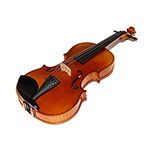
A violin, viola, cello or double bass can sound unsettling long before you add an effect. Changes in bow movement and playing position can turn a familiar instrument into something much harder to identify.
- Tremolo: Repeat short bow strokes rapidly on one note to create a nervous, trembling texture.
- Glissando: Slide a finger along the string while bowing. Slow slides can sound ghostly; quicker ones can create a sudden shriek.
- Sul ponticello: Bow close to the bridge for a glassy, overtone-rich sound. Start gently and explore the change in tone.
- Col legno battuto: Tap the string with the wood of the bow for a dry, rattling attack. This can mark the bow, so use an appropriate spare and get guidance if the technique is new to you.
Try this: Record one sustained note and a second take with a slow upward slide. Keep the slide quieter than the held note. A little instability can be more effective than a wall of screeching strings.
No string instrument available? Try the same arrangement with a string patch in your DAW. Use the articulations your instrument provides, or automate pitch bend for a sliding layer.
3. Turn a single note into a trail of suspicious echoes
Delay gives a short sound a second life. For horror textures, try repeats that feel slightly detached from the original performance: darker, thinner, wobblier or travelling backwards.
The Walrus Audio ARP-87 remains a useful compact option, with Digital, Analog, Lo-Fi and Slapback programs. Explore Analog or Lo-Fi for repeats with character, then use the damping and modulation controls to shape the atmosphere. Its Analog program is an emulation inside a digital pedal.
The Strymon TimeLine offers a broader range of delay textures, including reverse and pitch-shifted effects. It is a useful step up if you want several distinct sound design roles from one pedal.
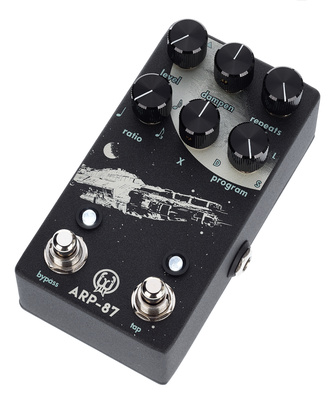
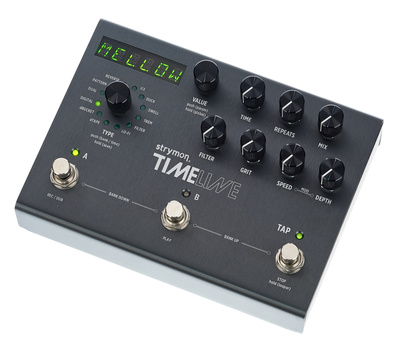
Try this: Play a short harmonic or a muted note. Start with a delay around half a second and only a few repeats, then gradually increase the feedback. Leave a pause before the next note so the echo becomes part of the performance. On the ARP-87, set the timing with tap tempo and the Ratio control.
In a DAW, try filtering the delayed signal separately. Removing some bass makes it thinner; reducing the treble pushes it into the distance. These are different colours, so choose the one that fits your scene. Keep the feedback under control as you experiment.
4. Build a room that sounds much bigger than it should
Reverb suggests a space around a sound. A tiny click followed by a long, dark tail can feel like something moving at the far end of an abandoned building.
The Walrus Audio Slöer Ambient Reverb brings stereo operation and five reverb modes to this approach. Its Dark mode adds a lower-octave component to the reverb tail, making it a useful starting point for low, lingering textures. The linked card is the black version.
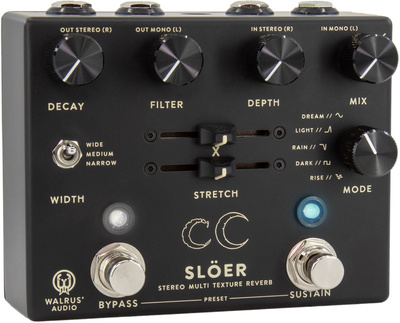
Walrus Audio
Slöer Ambient Reverb Black
Try this: Feed a sparse melody into a long reverb, reduce the brightness and leave several seconds between notes. Keep enough dry signal for each note to remain recognisable. If the tail swallows everything, lower the mix before adding more layers.
A reverb plug-in can do the job too. For a classic reverse swell, record a note with a long reverb tail, render it to audio and reverse the recording. Place the swell just before a new sound or a cut in your video.
5. Give your soundtrack a ghostly voice with a theremin
The theremin is played without touching it: your hands move near antennas to control pitch and volume. That continuous movement between notes makes it especially effective for wavering, voice-like phrases.
The Moog Theremini takes a modern approach with selectable sounds, adjustable pitch correction and a built-in stereo delay. Pitch correction can help you find notes; reducing it lets you explore more fluid slides.
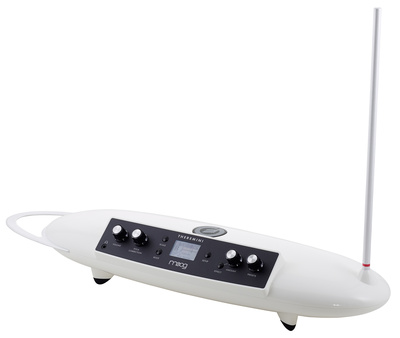
Moog
Theremini
Try this: Begin with a single slow rise in pitch rather than a melody. Fade it in, hold briefly, then let it fall away. Add just enough delay to leave a trace behind. A short phrase appearing once can be more unsettling than constant swooping.
If you are working entirely in software, use a simple synth tone with portamento and automate its volume. It is another way to explore that gliding, almost-vocal character.
6. Make a synth pattern that refuses to settle
A short repeating pattern can keep a horror cue moving while everything around it changes. Start with only a few notes, then alter the tone, rhythm or background texture each time the pattern returns.
The Moog Messenger is a monophonic analogue synth with a sequencer, suited to a single bass line, pulse or drone. The Arturia MiniFreak takes a different route: six-voice polyphony, digital sound engines and analogue filters give you room for uneasy chords as well as moving textures.


Try this: Program an eight-step pattern using C, E flat and G, with one F sharp near the end. Keep the notes short. Slowly open the filter over several repetitions, then remove a note from the pattern. The missing event can feel as significant as a new one.
For a drone, hold a low note and introduce gentle pitch or filter modulation. Keep the movement subtle at first. You can make this patch on a hardware instrument or a soft synth; the important part is giving the sound time to change.
7. Record something ordinary and make it unfamiliar
Some of the most useful horror sounds are already in your home: keys brushing together, paper crumpling, a squeaky hinge or fingers moving across a rough surface.
Your phone is enough to begin. For a dedicated recorder, the Zoom H1essential combines built-in X/Y stereo microphones with 32-bit float recording, useful for collecting material to edit later. Microphone placement still matters, especially around very loud sounds.
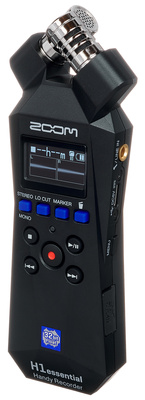
Zoom
H1essential
Try this: Record ten seconds of keys gently rattling. Import the recording into your DAW, slow it down or pitch it lower, then add a little reverb. Duplicate one short fragment, reverse it and place it before the original. Suddenly, an everyday object can suggest something approaching from the dark.
Keep a dry copy of each recording so you can return to it. Give your files descriptive names: “metal rattle – slow” is easier to find next October than “audio_047”.
Your challenge: build a 30-second Halloween soundtrack
Choose three ingredients from the ideas above and give each one a job:
- 0–10 seconds: establish the space. Fade in a low drone with a quiet room texture underneath.
- 10–20 seconds: introduce doubt. Add a sparse pulse, a string slide or an occasional dissonant note. Change one detail on each repeat.
- 20–27 seconds: raise the tension. Let a reversed recording swell towards the foreground, or gradually brighten the synth filter.
- 27–30 seconds: leave a gap. Cut away most of the sound, then end with one small click, note or breath of noise.
Listen back at a comfortable volume. If everything is loud and dense from the beginning, reduce the layers. Suspense needs somewhere to go, and silence is one of the most useful sounds you have.
What is the strangest sound you have turned into music? Tell us how you made it in the comments — and happy Halloween!














Comments 2