


FN
Excellent for the price, if you have the right USB connection
I bought this just for online meetings, but I noticed the mic preamp is excellent, and way better than I would expect to find at this price point! Sound quality from the headphone out is also good - definitely good enough for monitoring while recording.
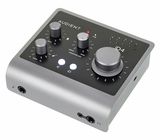
I really appreciate having a hardware gain pot like this (instead of software) and it works as it should. But I can't get used to this combination of infinity level pot (with not very useful visual feedback), and the rather coarse input/DAW mix pot. It would be much faster and more accurate to set the input/DAW listening balance with software faders - and actually, that is how they seem to have implemented it on the bigger iD14 MKII model. Looking at the features of that bigger version, it looks like a better value in other ways too, at least if you have use for two input channels.
My iD4MKII has been working without fault when I've hooked it to the Thunderbolt 3 port of a Mac or a PC. But I had problems with regular "blue" USB 3.0 connections: With one "blue" USB on a PC, playback dropped randomly to zero after stopping recording or closing an application (without any visual indication of this). With another USB 3.0 PC, I got it to work only after going through all Windows trouble shooting menus a couple of times, and then after the next restart of the computer the Audient just stopped working entirely - would have required a new install, it seemed. But I gave up on that one.
UPDATE 9.6.2022
I can report the Audient has been working without any problems with the "Always On USB 3.1 connector Gen 1" of my Lenovo Thinkpad. I just have to remember to bring up the heaphone level up from zero, every time when starting a new Teams meeting (with my other audio interfaces the level just stays where I left it last time). The special feature of the Lenovo "always on" USB-connector is that it keeps feeding power to the connected USB device even if I the laptop is put to sleep (unlike the other USB interfaces which I tried before). I think the previous USB problems that I had were related to powering down/up the computer.
When using the Audient with my laptop, and 48v phantom power active, the battery of my Lenovo is being consumed about twice as fast compared to no Audient connected.
I really appreciate having a hardware gain pot like this (instead of software) and it works as it should. But I can't get used to this combination of infinity level pot (with not very useful visual feedback), and the rather coarse input/DAW mix pot. It would be much faster and more accurate to set the input/DAW listening balance with software faders - and actually, that is how they seem to have implemented it on the bigger iD14 MKII model. Looking at the features of that bigger version, it looks like a better value in other ways too, at least if you have use for two input channels.
My iD4MKII has been working without fault when I've hooked it to the Thunderbolt 3 port of a Mac or a PC. But I had problems with regular "blue" USB 3.0 connections: With one "blue" USB on a PC, playback dropped randomly to zero after stopping recording or closing an application (without any visual indication of this). With another USB 3.0 PC, I got it to work only after going through all Windows trouble shooting menus a couple of times, and then after the next restart of the computer the Audient just stopped working entirely - would have required a new install, it seemed. But I gave up on that one.
UPDATE 9.6.2022
I can report the Audient has been working without any problems with the "Always On USB 3.1 connector Gen 1" of my Lenovo Thinkpad. I just have to remember to bring up the heaphone level up from zero, every time when starting a new Teams meeting (with my other audio interfaces the level just stays where I left it last time). The special feature of the Lenovo "always on" USB-connector is that it keeps feeding power to the connected USB device even if I the laptop is put to sleep (unlike the other USB interfaces which I tried before). I think the previous USB problems that I had were related to powering down/up the computer.
When using the Audient with my laptop, and 48v phantom power active, the battery of my Lenovo is being consumed about twice as fast compared to no Audient connected.
12
3
Report
t
Perhaps the best audio interface in my opinion for its price
Perfect for my high impedance DT 990. I like the preamps much better than the previous Scarlett Solo. For the price, it's just a miracle. I can recommend for purchase!
10
2
Report
KO
Mycket bra
[uppdatering]: Har nu installerat ett uttag för USB-C. Upplever att ljudet är ännu maffigare i lurarna, även om USB-A funkar för lyssning.
Har tidigare ägt Scarlett Solo gen3, Audient ID14 gen1.
ID4 klarar liksom ID14 att driva ett par Ω250 hörlurar (DT1990) även om ansluten till USB-A (dvs USB-A till enhetens USB-C), dock inte svinhögt, men tillräckligt.
Till skillnad från Scarlett Solo som har riktigt undermålig ljudstyrka om den endast är kopplad med USB-A (vet ej om ok med USB-C).
Konstruktionen känns härligt robust. I handhavande upplever jag att ID4 gen2 känns lite mer slipad än ID14 gen 1.
Tillägget med en 3,5mm tele för lurar, jämte 6,3mm, är nice för att koppla skruttiga referenslurar samtidigt utan att behöva meckla med att koppla in och ur lurarna.
Rent funktionellt uppskattar jag att ha volymratten på ovansidan och att den inte trängs jämte hörlursuttaget.
Ljudet är superbt både i lurar och monitorer.
Det enda som jag saknar är möjligheten att tysta ("mute") hörlurarna (är f.ö en funktion som också saknas i Scarlett Solo, men med den kan inte heller tysta monitorerna, det som kopplas in är alltid på).
Det finns en knapp för att tysta monitorerna, men lurarna är alltid på. Dock ska sägas att ljudet ut ur lurarna är så lågt när volymen är på önskad nivå ur monitorerna att det inte är något jag hör ändå.
Kanske är det bara jag som är korkad eller för lat för att läsa manualer, men det var vid installation inte helt självklart hur man får ljud öht. Det är bara en fråga om inställningar och att ha rattarna vridna rätt (t.ex att inte har "monitor mix" helt vriden mot "input").
Rekommenderas starkt, tycker personligen att det är mycket värt vad man får för pengarna i termer av prestanda, konstruktion och funktioner, och att det är helt klart värt att slanta upp med några hundringar mer än att köpa snäppet billigare diton av andra populära modeller.
(råkade sabba min ID14 gen1, varför jag behövde köpa en ny DAC. Provade först en Scarlett Solo men den höll inte alls måttet jämfört med vad jag blivit van vid, och jag är nästan lite glad att jag råkade pajja min förra DAC och tvingades köpa en ny. Gillar den här ID4 gen2 bättre, trots frånvaro av mute på hörlursutgången. Den känns "krispigare" överlag.)
Har tidigare ägt Scarlett Solo gen3, Audient ID14 gen1.
ID4 klarar liksom ID14 att driva ett par Ω250 hörlurar (DT1990) även om ansluten till USB-A (dvs USB-A till enhetens USB-C), dock inte svinhögt, men tillräckligt.
Till skillnad från Scarlett Solo som har riktigt undermålig ljudstyrka om den endast är kopplad med USB-A (vet ej om ok med USB-C).
Konstruktionen känns härligt robust. I handhavande upplever jag att ID4 gen2 känns lite mer slipad än ID14 gen 1.
Tillägget med en 3,5mm tele för lurar, jämte 6,3mm, är nice för att koppla skruttiga referenslurar samtidigt utan att behöva meckla med att koppla in och ur lurarna.
Rent funktionellt uppskattar jag att ha volymratten på ovansidan och att den inte trängs jämte hörlursuttaget.
Ljudet är superbt både i lurar och monitorer.
Det enda som jag saknar är möjligheten att tysta ("mute") hörlurarna (är f.ö en funktion som också saknas i Scarlett Solo, men med den kan inte heller tysta monitorerna, det som kopplas in är alltid på).
Det finns en knapp för att tysta monitorerna, men lurarna är alltid på. Dock ska sägas att ljudet ut ur lurarna är så lågt när volymen är på önskad nivå ur monitorerna att det inte är något jag hör ändå.
Kanske är det bara jag som är korkad eller för lat för att läsa manualer, men det var vid installation inte helt självklart hur man får ljud öht. Det är bara en fråga om inställningar och att ha rattarna vridna rätt (t.ex att inte har "monitor mix" helt vriden mot "input").
Rekommenderas starkt, tycker personligen att det är mycket värt vad man får för pengarna i termer av prestanda, konstruktion och funktioner, och att det är helt klart värt att slanta upp med några hundringar mer än att köpa snäppet billigare diton av andra populära modeller.
(råkade sabba min ID14 gen1, varför jag behövde köpa en ny DAC. Provade först en Scarlett Solo men den höll inte alls måttet jämfört med vad jag blivit van vid, och jag är nästan lite glad att jag råkade pajja min förra DAC och tvingades köpa en ny. Gillar den här ID4 gen2 bättre, trots frånvaro av mute på hörlursutgången. Den känns "krispigare" överlag.)
3
2
Report
Y
Easiest recommend ever.
I keep being amazed by how simple yet practical Audient keeps their audio interfaces.
I had my iD4 from the first gen and decided to just go to the next one.
From every single aspect it was a small upgrade.
1. Now there is a USB-C connection instead of the old usb style.
2. More headphone headroom, so, even if I crank it quite loud, the sound comes out clean.
3. The pre-amps are ridiculously clean and very warm sounding.
4. The latency/buffer handling is also quite improved.
I wish I had a complaint about this but I really don't.
If I REALLY had to nitpick, I'd probably say.. Well, now the audio meters are going from white straight to red when you turn it up, so, it doesn't show the orange color as the first gen did before. That was letting you know that you're approaching peak area. As I said, it's a 0.0001% nitpick that I think no one would ever really care about.
I absolutely recommend this, full-heartedly.
Great job by Audient!
Thanks for reading.
I had my iD4 from the first gen and decided to just go to the next one.
From every single aspect it was a small upgrade.
1. Now there is a USB-C connection instead of the old usb style.
2. More headphone headroom, so, even if I crank it quite loud, the sound comes out clean.
3. The pre-amps are ridiculously clean and very warm sounding.
4. The latency/buffer handling is also quite improved.
I wish I had a complaint about this but I really don't.
If I REALLY had to nitpick, I'd probably say.. Well, now the audio meters are going from white straight to red when you turn it up, so, it doesn't show the orange color as the first gen did before. That was letting you know that you're approaching peak area. As I said, it's a 0.0001% nitpick that I think no one would ever really care about.
I absolutely recommend this, full-heartedly.
Great job by Audient!
Thanks for reading.
15
1
Report
O
amazing sound and great build quality
this is a great product.
the sound quality is amazing, crisp and clean (I;m playing a PT special) and using maschine plus.
the user interface is intuitive and easy to manipulate
the fact that I can use USB-C to power it and connect to may Mac ia great !
highly recommended !
the sound quality is amazing, crisp and clean (I;m playing a PT special) and using maschine plus.
the user interface is intuitive and easy to manipulate
the fact that I can use USB-C to power it and connect to may Mac ia great !
highly recommended !
1
1
Report
Y
Bohdan Bronnikov
I have been actively using this audio interface since 2023, and believe me, I have a lot to say. Firstly, it has an excellent headphone amplifier that can drive even high-impedance headphones, and it also has a great dynamic range, making this interface perfect for mixing tracks and just listening to music. It also has a great preamp, which is very quiet and clean, providing a sterile sound. The audio interface is small and compact, convenient if you need to take it somewhere; sometimes I took it and my laptop to record something. In general, I like everything about it and there is nothing to complain about, except for the power button, which is not present. The audio interface turns on with the computer and cannot be turned off if you want, or are not using it; you have to unplug the USB cable to turn it off. Overall, the audio interface left a good impression on me, and I hope that Audient will delight me with an equally cool next-generation audio interface in the future. Audient, I love you!
1
0
Report
F
Recording made easier
Best for home studio. It is a Pro product. Very clean sound. I am using it with cubase 11 pro. Perfect combination.
1
0
Report
GF
best soundcard under 200€
Sturdy construction, pristine sound.
The software is almost useless but, if you don't need more than good converters this is the device you're looking for.
The software is almost useless but, if you don't need more than good converters this is the device you're looking for.
1
0
Report
HB
She's just adorable!)
For several months now I have been using audience id 4 mk 2. I'll start right away with the minuses. There are actually only 2 of which I noticed. The first thing is that the guitar input control knob somehow unscrewed, but I think this is not critical. But the second one is that when you voice and want to listen to yourself and the sound from the computer, it is a little inconvenient to adjust the volume of the voice and sounds of the PC. Ideally, it would be better to have 2 separate control knobs for monitoring and PC audio. But this is more of a personal observation of mine, it may not be a problem for others. I use it together with the sE 2200 microphone. And the sound is chic, I am very pleased with the quality and the coolest thing about her is a very pretty look. I advise you to buy, you will not regret it.
0
0
Report
b
Good experience
In my opinion a purchasing of audiointerface is special moment. By the way buying this of gear for the first time. I get a useful experience to connecting TRRS headphones into jack 3.5 without summary mic pin and ground pin on it. An adapter to make my headphones TRS help me a lot. Then I like it.
0
0
Report