


b
Glitchy scribble strip, but otherwise great
I primarily bought this controller to use specifically with Studio One, which is the main DAW I use for working with audio. As such my expectations were a very tight knit integration with the DAW. By and large I've been very happy with this, and while I'd love there to be a solution to make more tactile use of plugins on channels etc the technology hasn't really advanced that much yet. Nonetheless using this for Studio One is great and a far better experience than click with a mouse or using keyboard exclusively. I do still use both in conjunction with the controller, but each interface to its own strength.
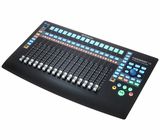
Pros - 16 faders makes mixing a breeze. There's a nice long throw on the faders and although they can be a little jittery at times when playing back automation I've found them very smooth to the touch. I also make a lot of use out of the transport controls, in particular the one big click encoder. The controller itself is nice and lightweight and doesn't take up a huge amount of space.
Cons
The scribble strip is glitchy. By this I mean I'll often turn the controller on and the first four items will simply display blank instead of informing me what's on those channels. This is usually solved by switching the controller off and back on - but this really seems to me like something that just wasn't tested and fixed before manufacturing. It seems like many other users have the same problem. This is why I have deducted points from quality. Also the positioning of these above the faders, and the use of quite small screens on them make them difficult to make out. Maybe it's me coming from old school world, but I'd instinctively have my scribble strip below the faders if they were the old "write on them yourself" kind, and that's where I'd expect to see them. Some people will complain about there only being one pan knob. This doesn't bother me, but.... it might be a consideration for other people.
Overall though I very much enjoy the experience of using the faderport - minor niggles aside!
Pros - 16 faders makes mixing a breeze. There's a nice long throw on the faders and although they can be a little jittery at times when playing back automation I've found them very smooth to the touch. I also make a lot of use out of the transport controls, in particular the one big click encoder. The controller itself is nice and lightweight and doesn't take up a huge amount of space.
Cons
The scribble strip is glitchy. By this I mean I'll often turn the controller on and the first four items will simply display blank instead of informing me what's on those channels. This is usually solved by switching the controller off and back on - but this really seems to me like something that just wasn't tested and fixed before manufacturing. It seems like many other users have the same problem. This is why I have deducted points from quality. Also the positioning of these above the faders, and the use of quite small screens on them make them difficult to make out. Maybe it's me coming from old school world, but I'd instinctively have my scribble strip below the faders if they were the old "write on them yourself" kind, and that's where I'd expect to see them. Some people will complain about there only being one pan knob. This doesn't bother me, but.... it might be a consideration for other people.
Overall though I very much enjoy the experience of using the faderport - minor niggles aside!
10
2
Report
V
High quality controller, could use some kind of kickstand option
Very impressed with it. I use it with Studio One, and the integration is flawless, it really speeds up the workflow. The faders feel nice, they are responsive and fast, and it really feels like a real analog mixer. Lots of features, basically covers everything you may need out of a DAW controller. However, the angle it lays on the desk is basically totally flat, so, if it's not right in front of you, you may have difficulty viewing the small scribble screens. It would be great if it had some kind of kickstand legs at the end just so you can adjust the angle if needed. I'm going to try my luck with a laptop stand, but for now, I just have a rolled up towel at the other end, so it's raised up a little.
10
0
Report
c
Problems with the encoder
When adjusting the blue encoder in the clockwise, in some cases it makes ghost "clicks" (I twist it in two steps — it makes three and after go back on one step. It seems to be minor problem, but annoying so much. In case you'll transport in the mixer section to the last channel and this "bug" appears the cursor goes back to previous to the last channel despite it has not to be there. So, it's not only annoying but doesn't work the way it should.
The second problem is "absence" of adequate fader calibrating. Even after doing it, the accurate is among 0.2-0.4dB.
Anyway, it`s so good and pleasant controller for me, as a Studio One user.
Everything related to the service was excellent — fast,
with high quality and without extra questions as it happens.
Pros:
+ good materials and design, it is pleasant to touch
+ best functionality for this price
+ really improves the workspace, mainly with the Studio One
Cons:
- glitchy encoder (big blue knob)
- rarely bugs with the scribble strip and some fader modes.
The second problem is "absence" of adequate fader calibrating. Even after doing it, the accurate is among 0.2-0.4dB.
Anyway, it`s so good and pleasant controller for me, as a Studio One user.
Everything related to the service was excellent — fast,
with high quality and without extra questions as it happens.
Pros:
+ good materials and design, it is pleasant to touch
+ best functionality for this price
+ really improves the workspace, mainly with the Studio One
Cons:
- glitchy encoder (big blue knob)
- rarely bugs with the scribble strip and some fader modes.
3
0
Report
R
Hands-on control that just works.
I genuinely have to give the FaderPort 16 a 5 out of 5 for this. I’ve only tested it with PreSonus Studio Pro 8 so far, but honestly, it’s pretty obvious that this controller was designed with PreSonus Studio Pro in mind.
Everything just works. No drama, no messing around with assigning special functions, and no unnecessary troubleshooting. Touch, latch, editing plugins, arming tracks, bus controls, and all the other functions I use regularly are right there, working as they should. Having used third-party controllers from other brands, where getting everything working properly could be a struggle, this is a genuinely refreshing experience.
And that alone is worth five stars in my book. Plug-and-play, hands-on control exactly as it should be. Absolutely fabulous.
The build quality is another highlight. The faders feel great, the motorised operation is smooth and responsive, and the whole unit feels solid thanks to its lovely metal construction. There’s no cheap, plasticky feel to it. It also looks fantastic, with a modern, sleek design that doesn’t take up an unreasonable amount of desk space while still providing a huge amount of functionality.
I’ve been using PreSonus Studio Pro as my main DAW for the past two years, and since last year, it has completely replaced Pro Tools in my workflow. Naturally, having a dedicated controller that integrates so seamlessly with my DAW makes working on projects an absolute joy. I’m loving it!
Of course, it’s not all perfect. The LCD displays aren’t particularly easy to see when the unit is sitting flat on the desk, so I’d definitely recommend a suitable stand or riser to angle it towards you. The displays are also monochrome, which feels a little dated by modern standards.
That said, neither of these things affects the actual functionality of the controller, and they certainly don’t take away from the experience of using it.
Overall, I absolutely love the FaderPort 16. If you’re using PreSonus Studio Pro, the seamless integration makes this a fantastic piece of kit. The build quality is excellent, the workflow is intuitive, and having all that hands-on control without fighting the hardware is precisely what I want from a DAW controller.
Everything just works. No drama, no messing around with assigning special functions, and no unnecessary troubleshooting. Touch, latch, editing plugins, arming tracks, bus controls, and all the other functions I use regularly are right there, working as they should. Having used third-party controllers from other brands, where getting everything working properly could be a struggle, this is a genuinely refreshing experience.
And that alone is worth five stars in my book. Plug-and-play, hands-on control exactly as it should be. Absolutely fabulous.
The build quality is another highlight. The faders feel great, the motorised operation is smooth and responsive, and the whole unit feels solid thanks to its lovely metal construction. There’s no cheap, plasticky feel to it. It also looks fantastic, with a modern, sleek design that doesn’t take up an unreasonable amount of desk space while still providing a huge amount of functionality.
I’ve been using PreSonus Studio Pro as my main DAW for the past two years, and since last year, it has completely replaced Pro Tools in my workflow. Naturally, having a dedicated controller that integrates so seamlessly with my DAW makes working on projects an absolute joy. I’m loving it!
Of course, it’s not all perfect. The LCD displays aren’t particularly easy to see when the unit is sitting flat on the desk, so I’d definitely recommend a suitable stand or riser to angle it towards you. The displays are also monochrome, which feels a little dated by modern standards.
That said, neither of these things affects the actual functionality of the controller, and they certainly don’t take away from the experience of using it.
Overall, I absolutely love the FaderPort 16. If you’re using PreSonus Studio Pro, the seamless integration makes this a fantastic piece of kit. The build quality is excellent, the workflow is intuitive, and having all that hands-on control without fighting the hardware is precisely what I want from a DAW controller.
0
0
Report
LC
A bit of a dissapointment
I am an Ableton Live user and I wanted a controller with motorized faders.
Though kind of supported, when all is said and done - it's superficial at best.
My biggest three complains:
1) There is no metering on the channels, rendering the unit almost useless since you can't tell what channel is outputting, but, rather you need to read the ancient, low quality, monochrome LCD display that has terrible view angle to make sure you loose any possible emersion and break your flow.
Technically there is a way to enable metering on these small LCD's but get this - it's different then the Live's. It's some kind of average that looks unnatural and frankly I hate it.
2) It doesn't understand drum racks. I love Live's drum racks and use them all the time. In Live you can expand them and use faders, but Faderport is clueless and you'd need to make a new channel for each element instead.
This means I'm not using the unit at the start of my projects and then I just forget it exists. Really bad, would be a huge improvement.
3) After replacing the unit with something else I thought ok, maybe I can use it for something else, like the inputs on my RME UFX+ or something.
After opening a ticket Presonus has made it clear that it's "only a DAW controller". And not a very good one at that.
Some good sides would be the faders - they are big and feel nice. But it feels as an incomplete solution.
I am sorry to say but I regret buying this unit, at least as an Ableton user. Maybe it's amazing for some other DAW's but I'd advise Ableton users to pass on this.
Though kind of supported, when all is said and done - it's superficial at best.
My biggest three complains:
1) There is no metering on the channels, rendering the unit almost useless since you can't tell what channel is outputting, but, rather you need to read the ancient, low quality, monochrome LCD display that has terrible view angle to make sure you loose any possible emersion and break your flow.
Technically there is a way to enable metering on these small LCD's but get this - it's different then the Live's. It's some kind of average that looks unnatural and frankly I hate it.
2) It doesn't understand drum racks. I love Live's drum racks and use them all the time. In Live you can expand them and use faders, but Faderport is clueless and you'd need to make a new channel for each element instead.
This means I'm not using the unit at the start of my projects and then I just forget it exists. Really bad, would be a huge improvement.
3) After replacing the unit with something else I thought ok, maybe I can use it for something else, like the inputs on my RME UFX+ or something.
After opening a ticket Presonus has made it clear that it's "only a DAW controller". And not a very good one at that.
Some good sides would be the faders - they are big and feel nice. But it feels as an incomplete solution.
I am sorry to say but I regret buying this unit, at least as an Ableton user. Maybe it's amazing for some other DAW's but I'd advise Ableton users to pass on this.
7
5
Report
ES
Not what expected
Build quality is not so good, sure that you can find better even with a lower price. It also gas a lot of connection issues with Cubase.
1
0
Report
H
Excellent
It comes half the price of UF8 (if you count the tracks total) and does an excellent job. Don't get me wrong, the UF8 is an amazing product and deffinitely a bit better, but if you want to save money buy this without thinking twice.
I use it with Ableton Live and works like a charm!
I use it with Ableton Live and works like a charm!
1
0
Report
B
Amazing DAW controller
The controller is very helpful for the balancing stage while mixing. Also it helps a lot while recording with the assigned record/undo buttons. Quick and good response. Also very easy to set up with Cubase. I totally recommend this product!
2
0
Report