


L
Handy control board
all controllers are "tweakers" or "launchers-triggers" or "keyboards". This one tries to cover all.
As a Keyboard Akai APC 40 Mk2 is not good. Pads are not velocity sensitive - not nice for recording drums or instrument parts - but still you can do it at on-the-go conditions.
As a "Launcher" - I personally find it very nice. 8 channel scenes is cool. When I work at the live sport events I need a variety of samples at my fingertips - Akai APC 40 Mk2 just shines here! I created my own template based on the default one.
As a Tweaker Akai Apc 40 Mk2 offers you 8 knobs-per-selected channel + 1 knob on the top - These knobs are endless spin with a nice travel. But it is often not enough. When Dj - I use a different Template and here I need an extra "Tweaker" to expand tweaking abilities of the device (I use DJTT Twister which is an amazing tweaking device) and for the reset (quick set-to-default) feature.
Mechanically Akai APC 40 Mk2 seems to be proof enough. Not a single issue while using it for 2 years (carefully but intensevely)
Faders and knobs are reliable not flimsy. I would recommend a plastic cover to lingering the lifetime of the device.
so Pro's:
- Universality and functionality within live or studio conditions
- Great launcher (Trigger)
- Fair Tweaker
- Made quality
- light weight
- Well thought Templates available
- Keeps your eyes away from the computer screen
- Foot controller switch functionality
- USB powering
- Price for all that
Con's:
- Not for a Keyboard-ing or Drum Pad-ing
- Not as compact as you may think (not a Con for me though)
- Volume faders a bit tricky to spot on the "0" level (I use fabric tape)
- Triggered clip is indicated in green weakly pulsing (I avoid green color when colouring the steady clips and miss hard pulsing)
I would recommend it for Ableton users as a "Launcher" ("Trigger") controller to pair it with some other "tweaker" deviceand keyboard if needed for a beautifull setup !
As a Keyboard Akai APC 40 Mk2 is not good. Pads are not velocity sensitive - not nice for recording drums or instrument parts - but still you can do it at on-the-go conditions.
As a "Launcher" - I personally find it very nice. 8 channel scenes is cool. When I work at the live sport events I need a variety of samples at my fingertips - Akai APC 40 Mk2 just shines here! I created my own template based on the default one.
As a Tweaker Akai Apc 40 Mk2 offers you 8 knobs-per-selected channel + 1 knob on the top - These knobs are endless spin with a nice travel. But it is often not enough. When Dj - I use a different Template and here I need an extra "Tweaker" to expand tweaking abilities of the device (I use DJTT Twister which is an amazing tweaking device) and for the reset (quick set-to-default) feature.
Mechanically Akai APC 40 Mk2 seems to be proof enough. Not a single issue while using it for 2 years (carefully but intensevely)
Faders and knobs are reliable not flimsy. I would recommend a plastic cover to lingering the lifetime of the device.
so Pro's:
- Universality and functionality within live or studio conditions
- Great launcher (Trigger)
- Fair Tweaker
- Made quality
- light weight
- Well thought Templates available
- Keeps your eyes away from the computer screen
- Foot controller switch functionality
- USB powering
- Price for all that
Con's:
- Not for a Keyboard-ing or Drum Pad-ing
- Not as compact as you may think (not a Con for me though)
- Volume faders a bit tricky to spot on the "0" level (I use fabric tape)
- Triggered clip is indicated in green weakly pulsing (I avoid green color when colouring the steady clips and miss hard pulsing)
I would recommend it for Ableton users as a "Launcher" ("Trigger") controller to pair it with some other "tweaker" deviceand keyboard if needed for a beautifull setup !
6
2
Report
MM
APC 40 Mk2 - Plays Like Synth
I’ve been using the AKAI Professional APC40 Mk2 for a while now, and honestly—it’s one of those pieces of gear that just clicks with how I work, especially in Ableton. From the moment I plugged it in, everything was just... there. No fiddling with settings or custom mappings. It auto-bound to Ableton beautifully and felt like an extension of the software right away.
What really blew me away is how versatile it is. Of course, it shines in live performance mode, launching clips, controlling effects, and navigating the session view with ease. But I actually ended up using it a lot as a mixing console during production. Faders are smooth, knobs are responsive, and there’s this feeling of control that you just don’t get with a mouse and keyboard.
One thing I didn’t expect was how well it works with VST synths—specifically Massive X in my case. The top row of knobs basically turns it into a kind of hardware synth controller. I find myself twisting knobs and stumbling onto sounds I wouldn't have come up with otherwise. It really sparks creativity in a way that's hard to describe until you try it.
Build-wise, it feels solid. The knobs have a good resistance—not too loose, not too stiff. The buttons light up nicely and are easy to see even in low light. The only small downside for me is the plastic front panel. It’s a bit glossy and picks up fingerprints and reflections. A matte or more textured finish would have looked a bit more pro maybe, but that’s really nitpicking and more about personal taste than anything else.
All in all, if you’re an Ableton user and you like having that physical connection to your music—not just clicking around—this is a fantastic piece of gear. Whether you're mixing, jamming live, or just tweaking sounds in the studio, the APC40 Mk2 delivers. If it fits your budget, I’d definitely recommend giving it a go.
What really blew me away is how versatile it is. Of course, it shines in live performance mode, launching clips, controlling effects, and navigating the session view with ease. But I actually ended up using it a lot as a mixing console during production. Faders are smooth, knobs are responsive, and there’s this feeling of control that you just don’t get with a mouse and keyboard.
One thing I didn’t expect was how well it works with VST synths—specifically Massive X in my case. The top row of knobs basically turns it into a kind of hardware synth controller. I find myself twisting knobs and stumbling onto sounds I wouldn't have come up with otherwise. It really sparks creativity in a way that's hard to describe until you try it.
Build-wise, it feels solid. The knobs have a good resistance—not too loose, not too stiff. The buttons light up nicely and are easy to see even in low light. The only small downside for me is the plastic front panel. It’s a bit glossy and picks up fingerprints and reflections. A matte or more textured finish would have looked a bit more pro maybe, but that’s really nitpicking and more about personal taste than anything else.
All in all, if you’re an Ableton user and you like having that physical connection to your music—not just clicking around—this is a fantastic piece of gear. Whether you're mixing, jamming live, or just tweaking sounds in the studio, the APC40 Mk2 delivers. If it fits your budget, I’d definitely recommend giving it a go.
1
0
Report
S
The Ultimate Performance Extension for Ableton Live
The AKAI Professional APC 40 Mk2 is widely considered the gold standard for tactile control over Ableton Live. It bridges the gap between software and hardware perfectly, making it an essential tool for both live performance and studio arrangement.
Why this controller is a must-have:
Deep Integration: It is pre-mapped to Ableton Live out of the box, meaning you can plug it in and start performing without any complicated setup. Its controls correspond 1:1 with the software interface.
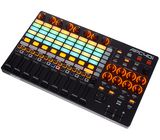
RGB Clip Grid: The 5x8 grid features bright RGB LEDs that mirror your clip colors in Ableton, providing instant visual feedback on whether a clip is loaded, playing, or recording.
Intuitive Layout: Akai improved the design by moving the channel knobs to the top of each track, creating a much more natural, "in-line" workflow.
Powerful Mixing Tools: With nine reinforced faders, eight device control knobs, and a dedicated A/B crossfader that can be assigned on the fly, you have total hands-on control over your mix without touching a mouse.
Highly Portable: The Mk2 is sleeker and lighter than the original, and because it is fully USB bus-powered, it is incredibly easy to take from the studio to the stage.
Creative Freedom: The "User" mode allows you to re-assign controls to suit your personal style, turning the unit into a completely customizable instrument.
If you want to move away from clicking a screen and start playing your Ableton sessions like a real instrument, this is the best investment you can make.
Why this controller is a must-have:
Deep Integration: It is pre-mapped to Ableton Live out of the box, meaning you can plug it in and start performing without any complicated setup. Its controls correspond 1:1 with the software interface.
RGB Clip Grid: The 5x8 grid features bright RGB LEDs that mirror your clip colors in Ableton, providing instant visual feedback on whether a clip is loaded, playing, or recording.
Intuitive Layout: Akai improved the design by moving the channel knobs to the top of each track, creating a much more natural, "in-line" workflow.
Powerful Mixing Tools: With nine reinforced faders, eight device control knobs, and a dedicated A/B crossfader that can be assigned on the fly, you have total hands-on control over your mix without touching a mouse.
Highly Portable: The Mk2 is sleeker and lighter than the original, and because it is fully USB bus-powered, it is incredibly easy to take from the studio to the stage.
Creative Freedom: The "User" mode allows you to re-assign controls to suit your personal style, turning the unit into a completely customizable instrument.
If you want to move away from clicking a screen and start playing your Ableton sessions like a real instrument, this is the best investment you can make.
0
0
Report
A
Works good with ableton!
It is all about fun! Works very good with ableton.
0
0
Report
a
I bought APC40 mkii for VJing. After reviewing multiple videos and articles, I decided to buy this model. Overall, this device is perfect for those who are working in AV and VJ. This device allows to work with different types of stage design, allowing effortless work.
The only thing that may be an issues is the size. APC40 is a bit bigger than I expected, but it is just in my opinion. In any case, If you are a VJ, you should deffinetly try this device
The only thing that may be an issues is the size. APC40 is a bit bigger than I expected, but it is just in my opinion. In any case, If you are a VJ, you should deffinetly try this device
0
0
Report
A
APC40 mk2
I bought it for live use with Ableton and Traktor. The unit is very slim and lightweight so it fits perfectly in my laptop bag, while still being really sturdy and good build quality. It works with Ableton straight away, and takes very little time to learn. I haven't used the mk1 version, so it's all new to me. Mapping it to Traktor is a bit more challenging, as Akai hasn't published specific midi implementation charts which would help e.g. with assigning different LED colors, but for the most part it seems very easy to setup to any software.
I'm really looking forward to actually taking it to gigs and I'm sure it will perform really well.
Deciding between this and the Push is simply a matter of needs - if you need something to actually make music with, buy the Push. If you need a controller for performing, this seems to be the best at the moment.
I'm really looking forward to actually taking it to gigs and I'm sure it will perform really well.
Deciding between this and the Push is simply a matter of needs - if you need something to actually make music with, buy the Push. If you need a controller for performing, this seems to be the best at the moment.
2
0
Report
x
Poor fader quality
Unfortunately, one of the faders I purchased would not reset to zero after 2 months of use ,Everything else is fine.
0
0
Report
C
Akai professionnel apc 40m ke
Franchement,je ne m'attendais pas à un résultat aussi bluffant.🙃
C'est vraiment incroyable ce que l'on peut faire avec cette petite merveille.
A peine deux en main et je sortais déjà des sons super sur une chanson de mon choix.
Le seul petit bémol, je pensais avoir une console avec un peu de métal
Tout est plastiques.
A voir dans le temps
Si non c'est juste génial. Il ne faut pas être un expert pour la comprendre.
Elle fonctionne avec ablation live lite qui est gratuit avec l'achat de la console.
Je vais recommander la console piano akai mini pour avoir encore d'autres effet .
C'est vraiment incroyable ce que l'on peut faire avec cette petite merveille.
A peine deux en main et je sortais déjà des sons super sur une chanson de mon choix.
Le seul petit bémol, je pensais avoir une console avec un peu de métal
Tout est plastiques.
A voir dans le temps
Si non c'est juste génial. Il ne faut pas être un expert pour la comprendre.
Elle fonctionne avec ablation live lite qui est gratuit avec l'achat de la console.
Je vais recommander la console piano akai mini pour avoir encore d'autres effet .
0
0
Report
DZ
Excellent Quality
I had one APC40MKII before order from a different supplier and the quality was really not up to standard (knobs and fader felt like they almost coming off), the new version I received from Thomann yesterday is a complete different beast, everything works very well. Now we just need to hope that Ableton and Akai come together to release an MK3 at some point. The combination with physical faders and knobs is still unbeatable for live performance situations.
0
0
Report
HR
Highly Recommended.
I mostly compose in MIDI tracks - this machine is helpful for arranging my tracks in rhythm (with the adjustable tempo volume), and the easy integration with Ableton is very simple - you just plug the USB and it is ready to go.. That simple.
For me, there are no cons, only pros.
You can also use this APC40 controller to record tracks in the session view with the first few buttons, but I generally record my midi tracks in the arrangement view.
With the upcoming MIDI 2.0 update version, and the MIDI 2.0 cables, this machine will do wonders I think.
For me, there are no cons, only pros.
You can also use this APC40 controller to record tracks in the session view with the first few buttons, but I generally record my midi tracks in the arrangement view.
With the upcoming MIDI 2.0 update version, and the MIDI 2.0 cables, this machine will do wonders I think.
0
0
Report