


AKAI Professional MPK mini Plus B-Stock

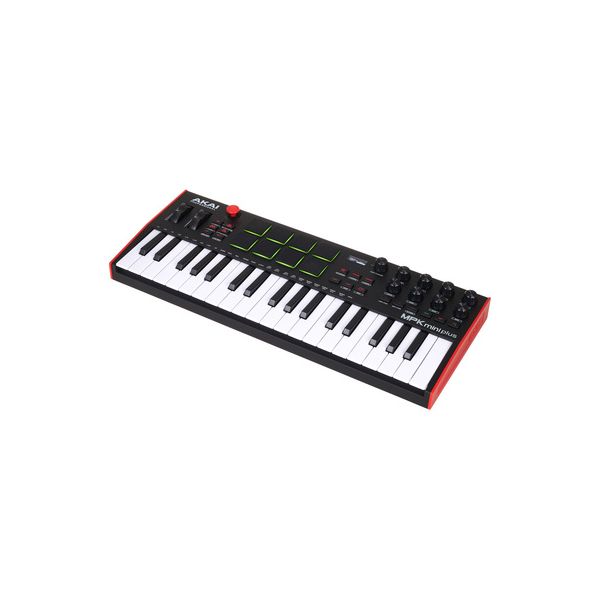
USB Controller Keyboard
- 37 velocity-sensitive mini keys
- Octave selector button for ten octaves range
- Pitch and modulation wheel
- Freely assignable 4-way joystick
- Eight velocity-sensitive MPC pads with note repeat and full level function
- Eight assignable rotary controls
- NKS support for direct control of over 2000 NKS-compatible instruments and effects
- OLED display
- Arpeggiator with seven playing modes, eight time signatures and adjustable swing
- Internal synchronisation with tap tempo (30 - 240 BPM) or external synchronisation via USB and MIDI
- Chords and Scales mode
- Step sequencer with up to 64 steps and live recording mode
- Plug'n'play operation without driver installation
- Power supply via USB-B port
- Outputs for pitch CV, modulation CV and gate: 3.5 mm jack
- Clock input and output: 3.5 mm jack
- Sustain pedal input: 6.3 mm jack
- USB-B port (Class Compliant)
- MIDI In / Out
- Dimensions (W x D x H): 451 x 180 x 52 mm
- Weight: 1260 g
- Includes free Native Instruments Komplete 15 Select Bundle for a genre of your choice for immediate testing and use of the NKS functionality
-
Available since October 2022
-
Item number 554250
-
Sales Unit 1 piece(s)
Intuitive Controller to unleash full Creativity
)
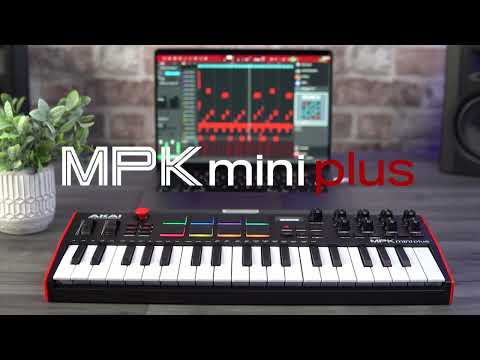
The AKAI Professional MPK mini Plus is a controller with access to the most important parameters for expressive performances. Melodies can be played through 37 keys. Samples can be triggered and beats can be played rhythmically with its eight MPC Pads. Next to the Mod- and Pitch-Wheel, as well as the joystick, eight assignable encoders enable control over more parameters. The OLED-Display gives information about the current parameter values. More encoders above it allow changing internal chord settings and global parameters. Furthermore, melodic sequences can be created with the internal arpeggiator. A transport section provides comfortable control over recording and playback. Extensive connectivity options on its rear side allow an easy and seamless integration into every setup.
)
37 Keys & 8 Pads for a Precise Performance
This controller uses a miniature keyboard of the type Gen 2 with 37 velocity-sensitive keys, which allows a precise performance. The eight drum pads in this controller are taken out of the well-known MPC-Series and are also velocity-sensitive. For visual feedback, they are backlit with RGB-colors. The green button Bank A/B allows switching between two banks, which makes it possible to access 16 samples in total. Below the assignable joystick with X/Y-parameters you can find buttons for Note Repeat and Full Level, for changing the octave, tapping the tempo, as well as a button to activate the internal arpeggiator. Scales and chords can be set with buttons found below the display. Parameters can be assigned with the encoder next to it, which can also be done with the software “Program Editor” when the controller is connected to a computer. In total, eight setups can be stored as presets inside the controller. They can be loaded through the MPC-Pads.
)
Arpeggiator with Step Editor included
The internal arpeggiator features six modes for variable playback of all recorded notes: Up, Down, Exclusive, Inclusive, Order, and Random. Sequences that are shown on the display can be created when the buttons Shift and Octave Down are pressed at the same time. In addition to the six modes, Time-Division, swing, and the tempo between 30 and 240 BPM can be set for the apreggiator. The length of the notes can also be adjusted with the parameter “Gate”. The playback of all notes can happen within a range of 4 octaves, which can be set individually. The Latch mode allows adding notes when the corresponding button is pressed. You can choose the internal clock or an external MIDI-clock, as well as the Trig Mode as a clock for using data received by the CV input on the rear side of the controller.
)
Seamless Integration
Advanced music producers will find an easy to handle controller that can be placed on every table with its compact size. Beginners will be happy to find a complete DAW for music production included in the software package. Thanks to Plug’n’Play, no drivers need to be installed – just connect this controller to your DAW and start the production! On the rear side you can find a USB port, a MIDI-In and-Out, as well as CV outputs for pitch, Gate, modulation, and velocity via optionally available 3,5mm cinch cables to external equipment. In addition to that, you can connect an optionally available pedal for sustain to hold notes played with the controller. When the AKAI Professional MPK mini Plus is connected to a computer, you can send MIDI data to and from the computer. Settings of this controller can be configured through the software “Program Editor”.
)
About Akai Professional
Akai Professional has its origins in the long-established Japanese company Akai, founded in 1929, which initially manufactured electric motors, soon to be followed by high-quality tape recorders and hi-fi products. Since 1988, Akai has also become a household name like no other on the Hip-Hop scene. With the development of its first MIDI Production Centre (MPC for short), created in collaboration with Roger Linn, Akai wrote history by decisively influencing the sound of hip-hop and electronic music, which it continues to do to this very day. Famous exponents of the MPC series include DJ Shadow, Eminem, and Kanye West. Today, Akai is also well known for its robust and versatile USB MIDI controllers, not least of which is the bulletproof APC range of Ableton controllers.
Setting Scales and Chords intuitively
Besides an assignment of parameters, scales and chords can also be configured for a proper performance. The keys can be set to play fourteen scales with them. The major key can also be set. When chord mode is active, you can play a full chord with just hitting a single key. Chord inversions can be played in this mode when shift is pressed simultaneously with a note. Configuring the type of the chord and the inversion in the chord mode can be done when pressing the buttons Chord and Shift. You can also adjust these and more settings for a smooth and customized workflow in the software “Program Editor” when the controller is connected to a computer. This includes, in addition to assigning parameters to encoders of the controller, minimum and maximum values of the parameters.
In the spotlight
NKS
The Native Kontrol Standard (NKS), developed by Native Instruments, is a universal protocol adopted by hundreds of plug-in developers that allows virtual instruments to be seamlessly controlled via supported hardware controllers. With standardised parameter mapping, automatic preset browsing, and deep host integration, NKS dramatically reduces configuration time and streamlines production workflows. NKS-registered products also grant instant access to premium sound libraries and advanced control features. This product is fully NKS compatible, as indicated by the official NKS logo.
)

Compare options
-
AKAI Professional Master Keyboards (up to 49 Keys) at a glance
-
Display Master Keyboards (up to 49 Keys) from $ 100 - $ 140
-
Go to product group Master Keyboards (up to 49 Keys)
-
Go to product group MIDI Master Keyboards
-
Go to product group Keys
-
Show manufacturer details for AKAI Professional
-
AKAI Professional Keys at a glance